
Range Rover Evoque: Epb manual use
Epb manual use
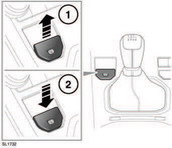
1. To apply the parking brake, with the vehicle stationary, pull up the lever and release it.

The parking brake warning lamp will illuminate. It is important to confirm that the lamp is continuously illuminated (not flashing), as this indicates the brake has been correctly applied.
If the lever is operated when the vehicle speed is less than 3km/h (2mph) the vehicle will be brought to an abrupt stop.
The stop lamps will not be illuminated.
If a fault is detected the warning lamp will flash and a PARKBRAKE message will be displayed in the message centre.
Note: The red brake warning indicator will continue to be illuminated for at least ten seconds after the ignition has been turned off.
2. To release the parking brake, press the brake pedal and press down on the EPB lever.
 Driving the vehicle with the
parking
brake applied, or repeated use of the
parking brake to slow the vehicle, may
cause serious damage to the brake
system.
Driving the vehicle with the
parking
brake applied, or repeated use of the
parking brake to slow the vehicle, may
cause serious damage to the brake
system.
In an emergency, with the vehicle travelling more than 3km/h (2mph), pulling on the EPB lever and holding gives a gradual reduction in speed. The brake warning indicator will illuminate accompanied by a warning tone and a PARKBRAKE message appearing in the message centre. The stop lamps will illuminate.
READ NEXT:
 Epb automatic use
EPB will be applied automatically if the ignition
is switched off and the vehicle speed is below
3km/h (2mph).
To prevent automatic operation, when the
vehicle is stationary, press and hold the EP
Epb warning indicators
If the system detects a fault with the EPB, the
amber brake warning indicator will illuminate
accompanied by a message on the message
centre.
If the system detects a fault while EPB is
operating,
SEE MORE:
Important information
The information contained in this handbook covers all vehicle derivatives and
optional equipment,
some of which may not be fitted to your vehicle. Due to printing cycles, this
handbook may include
descriptions of options before they become generally available.
The vehicle options, hardware an
Symbols used in this handbook
Safety warnings indicate either a procedure which must be followed
precisely, or
information that should be considered with great care, in order to avoid the
possibility
of personal injury.
Cautions indicate either a procedure which must be followed precisely, or
information that
should
