
Range Rover Evoque: A-Pillar Trim Panel, B-Pillar Upper Trim Panel 5-Door
Land Rover Range Rover Evoque L538 (2011–2018) Service Manual / Body and Paint / Interior Trim and Ornamentation / A-Pillar Trim Panel, B-Pillar Upper Trim Panel 5-Door
A-Pillar Trim Panel
Removal
NOTE: Removal steps in this procedure may contain installation details.
1. Torque: 6 Nm
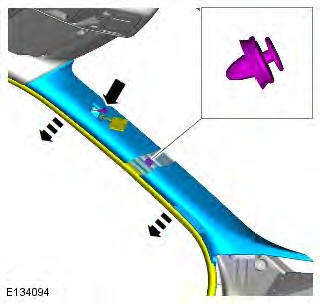
Installation
1. To install, reverse the removal procedure.
B-Pillar Upper Trim Panel 5-Door
Removal
NOTE: Removal steps in this procedure may contain installation details.
1.
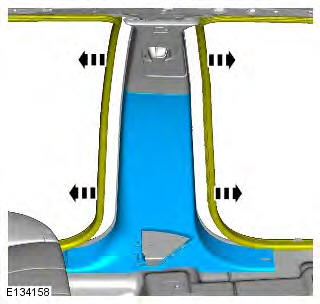
2.
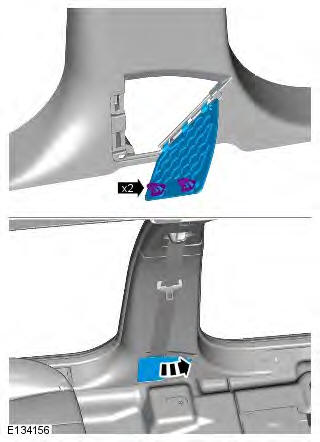
3. CAUTION: Discard the bolt.
Torque: 45 Nm
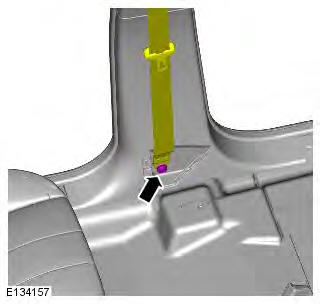
4.
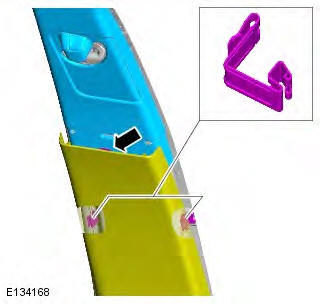
5. Torque: 6 Nm
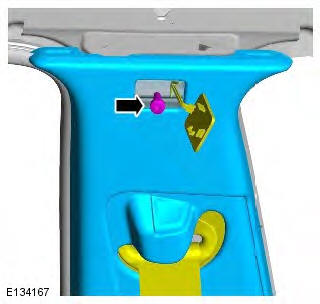
6.
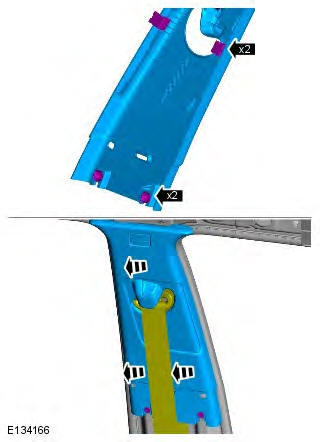
7.
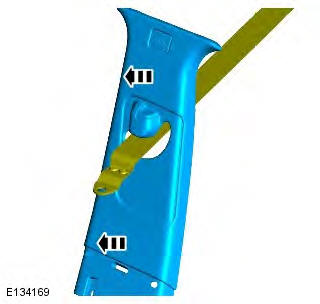
Installation
1. WARNING: Make sure that a new bolt is installed.
CAUTION: Make sure the safety belt is secure and correctly installed.
NOTE: Make sure the safety belt is operating correctly.
To install, reverse the removal procedure.
READ NEXT:
 B-Pillar Lower Trim Panel, D-Pillar Trim Panel
B-Pillar Lower Trim Panel
Removal
NOTE: Removal steps in this procedure may contain installation details.
1.
2.
3.
4. CAUTION: Discard the bolt.
Torque: 45 Nm
5.
6.
Installation
1. WARNING: Make
Front Door Trim Panel
Removal
NOTE: Removal steps in this procedure may contain installation details.
All vehicles
1. Torque: 6 Nm
2. Torque: 6 Nm
3. Torque: 0.9 Nm
4. Torque: 1.3 Nm
5-door
5.
3-door
6.
All vehicles
Rear Door Trim Panel
Removal
NOTE: Removal steps in this procedure may contain installation details.
1. Torque: 1.3 Nm
2. Torque: 6 Nm
3. Torque: 6 Nm
4.
5.
6.
7. NOTE: Do not disassemble further if the
component is
SEE MORE:
Important information
The information contained in this handbook covers all vehicle derivatives and
optional equipment,
some of which may not be fitted to your vehicle. Due to printing cycles, this
handbook may include
descriptions of options before they become generally available.
The vehicle options, hardware an
Symbols used in this handbook
Safety warnings indicate either a procedure which must be followed
precisely, or
information that should be considered with great care, in order to avoid the
possibility
of personal injury.
Cautions indicate either a procedure which must be followed precisely, or
information that
should
© 2011-2026 Copyright www.rrevoque.org - 0.0094
